
QuickPic - Photo Gallery with Google Drive Support5.0.0 - Google Play
You'll be able to see results in few seconds.
Publisher Description
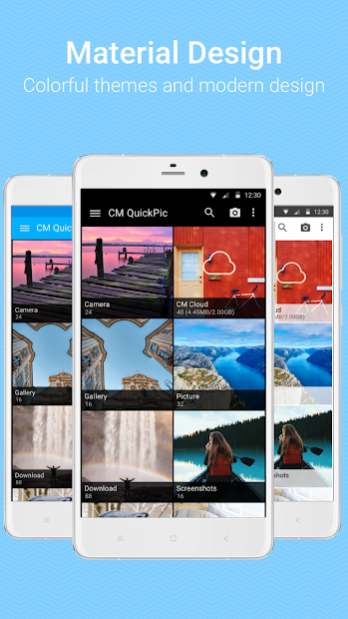


Fast, light and modern! Loved by over 10 million users, with an overall rating of 4.6, QuickPic is ideally the best alternative gallery app designed for managing your beloved photos. It’s significantly smaller than other gallery apps, but packs more power than any of them.
◆ Reviews
ANDROIDPIT: One of the best free Android apps of 2015
UltraLinx: Arguably the best gallery app for Android
Life Hacker: QuickPic is our favorite gallery replacement
◆ Features
Material Design:
Colorful themes and modern design, transparent layered and immersive user interface.
Fast:
Quick app launching, view thousands of your photos instantly. QuickPic's smooth user experience is optimized for large screens and multiple finger gestures, and contains no ads or extra permissions.
Privacy:
Easily hide or exclude your private photos and videos from all gallery apps and protect them with a password.
Management:
Powerful file management features, including sort, rename, create new folders, moving/copying data and more.
CM Cloud:
Offering speedy back up and restoration, as well as password protection. Your photos will be stored on industry leading Amazon S3 servers to help you preserve all your precious memories securely.
◆ Other Functions
> HD Quality:
View thousands of your photos instantly in a high quality slideshow
> Customize Photos:
Internal picture editor which allows you to rotate, shrink, crop, and set as your wallpaper with the best quality.
> Storage Support:
Supports multiple online album services, including Picasa, Google Drive, Dropbox, Flickr, OneDrive, Box, Amazon, Yandex, 500px, OwnCloud, Samba and more. You can even auto back up your photos to your specified cloud or computer.
> Multiple Media Support:
QuickPic’s supported image and video formats are jpg, jpeg, jps, png, gif, bmp, wbmp, mpo, webp, 3gp, 3gpp, 3g2, avi, mp4, mkv, mov, m4v, mpeg, asf, divx, flv, k3g, mpg, m2ts, mts, rm, rmvb, skm, ts, wmv, webm. (Note: Some file types might not be supported on certain devices)
◆ Tips
1) Due to the restrictions of Android 4.4, non-stock apps are unable to modify files within an external SD Card. Unfortunately we cannot bypass this restriction.
2) Clean your app data or re-install QuickPic to clear your password.
◆ Keep in touch
♥ Translation volunteers: https://crowdin.com/project/quickpic-localization
♥ Google+ Beta Community: https://goo.gl/5Hzxyy
♥ Facebook Community: https://www.facebook.com/quickpic.mobile
TOS Privacy:http://www.cmcm.com/protocol/site/tos.html
Policy:http://www.cmcm.com/protocol/site/privacy.html
Ad Choice:http://www.cmcm.com/protocol/site/ad-choice.html
About QuickPic - Photo Gallery with Google Drive Support
The company that develops QuickPic - Photo Gallery with Google Drive Support is Cheetah Mobile. The latest version released by its developer is 5.0.0.
To install QuickPic - Photo Gallery with Google Drive Support on your Android device, just click the green Continue To App button above to start the installation process. The app is listed on our website since 2019-07-23 and was downloaded 0 times. We have already checked if the download link is safe, however for your own protection we recommend that you scan the downloaded app with your antivirus. Your antivirus may detect the QuickPic - Photo Gallery with Google Drive Support as malware as malware if the download link to com.alensw.PicFolder is broken.
How to install QuickPic - Photo Gallery with Google Drive Support on your Android device:
- Click on the Continue To App button on our website. This will redirect you to Google Play.
- Once the QuickPic - Photo Gallery with Google Drive Support is shown in the Google Play listing of your Android device, you can start its download and installation. Tap on the Install button located below the search bar and to the right of the app icon.
- A pop-up window with the permissions required by QuickPic - Photo Gallery with Google Drive Support will be shown. Click on Accept to continue the process.
- QuickPic - Photo Gallery with Google Drive Support will be downloaded onto your device, displaying a progress. Once the download completes, the installation will start and you'll get a notification after the installation is finished.
Program Details
System requirements
Download information
Pricing
Version History
version 5.0.0
posted on 2019-07-23
version 4.6.9.1486
posted on 2016-11-28
4.6.9,1. Added Cloud Album function. Automatically categorize photos according to your local albums.,2. App enhancements and bug fixes
version 3.8
posted on 2014-10-27
Several fixes and updates
Disclaimer
Official Google Play Link
We do not host QuickPic - Photo Gallery with Google Drive Support on our servers. We did not scan it for viruses, adware, spyware or other type of malware. This app is hosted by Google and passed their terms and conditions to be listed there. We recommend caution when installing it.
The Google Play link for QuickPic - Photo Gallery with Google Drive Support is provided to you by apps112.com without any warranties, representations or guarantees of any kind, so access it at your own risk.
If you have questions regarding this particular app contact the publisher directly. For questions about the functionalities of apps112.com contact us.
